WindowManager技术总结
Window窗口是怎么管理的?

添加一个窗口的过程就是WMS为窗口分配一块Surface,用来承载window,一块块的Surface在WMS的管理下有序的排列在屏幕上。
在应用层开发时,我们只操作UI层,通过WindowManager来操作Window,最终调到WMS。WMS是在一个单独的进程中,内部采用IPC进行交互。
窗口的分类
- 应用窗口:应用窗口对应着一个Activity/Fragment
- 子窗口:子窗口不能单独存在,需要依附在特定的父窗口(如应用窗口、系统窗口),典型的如Dialog就是子窗口
- 系统窗口:系统窗口就要涉及到权限了(toast也是系统窗口)
窗口是有层级的,层级大的窗口会覆盖层级小的窗口,具体分布如下:

而层级的定义就是通过WindowManager.LayoutParams的type参数。
WindowManager的具体实现
WindowManager.java
WindowManager是个接口,主要的代码是LayoutParams。它继承了ViewManager接口类。而viewManager接口是很多View类的父类。
public interface ViewManager{
    public void addView(View view, ViewGroup.LayoutParams params);
    public void updateViewLayout(View view, ViewGroup.LayoutParams params);
    public void removeView(View view);
}
WindowManager就是主要通过这3个方法完成对窗口的控制。WindowManager的具体实现类是WindowManagerImpl。
addView
@Override
public void addView(@NonNull View view, @NonNull ViewGroup.LayoutParams params) {
    applyDefaultToken(params);
    mGlobal.addView(view, params, mContext.getDisplay(), mParentWindow);
}
applyDefaultToken()是当没有token是,自动添加上一个默认的token【token其实就是IBinder】。
getDisplay()是获取Display类,每个窗口都需要绑定到特定的Display中,即窗口和Display对象是一一对应的。
Display类
提供逻辑显示区域大小、密度等相关信息。
应用程序显示区域指定的部分可能包含一个应用程序窗口的显示,排除系统装饰。应用程序显示区域可能比真正的显示区域要小,因为系统减去所需的空间装饰元素状态栏等。可以使用一下方法来获取应用程序显示区域的信息: getSize(Point), getRectSize(Rect), getHeight() 和getMetrics(DisplayMetrics)
Display类是无法自己实例化的,需要通过getService获取。
WindowManager windowmanager = (WindowManager) context.getSystemService(Context.WINDOW_SERVICE);
windowmanager.getDefaultDisplay()
DisplayMetrics类
为一个描述显示区域信息的结构体类,包括大小、密度、字体缩放等。
它需要依托Display类完成实例化。
DisplayMetrics metrics = new DisplayMetrics();
getWindowManager().getDefaultDisplay().getMetrics(metrics);
个人感觉DisplayMetrics应该是对Display类的一种补充。
addView的核心代码:
ViewRootImpl root;
View panelParentView = null;

root = new ViewRootImpl(view.getContext(), display);
view.setLayoutParams(wparams);
mViews.add(view);
mRoots.add(root);
mParams.add(wparams);

// do this last because it fires off messages to start doing things
try {
        root.setView(view, wparams, panelParentView);
} catch (RuntimeException e) {
        // BadTokenException or InvalidDisplayException, clean up.
        synchronized (mLock) {
            final int index = findViewLocked(view, false);
            if (index >= 0) {
                removeViewLocked(index, true);
            }
        }
        throw e;
}
几个重要的集合:
private final ArrayList<View> mViews = new ArrayList<View>();
private final ArrayList<ViewRootImpl> mRoots = new ArrayList<ViewRootImpl>();
private final ArrayList<WindowManager.LayoutParams> mParams = new ArrayList<WindowManager.LayoutParams>();
private final ArraySet<View> mDyingViews = new ArraySet<View>();
他们的具体含义:

首先创建ViewRootImpl实例对象,就是最顶级的ViewGroup,承载我们自己的View。
最后调用setView()将view绘制到界面上。它的核心代码:
// Schedule the first layout -before- adding to the window
                // manager, to make sure we do the relayout before receiving
                // any other events from the system.
                requestLayout();
                if ((mWindowAttributes.inputFeatures
                        & WindowManager.LayoutParams.INPUT_FEATURE_NO_INPUT_CHANNEL) == 0) {
                    mInputChannel = new InputChannel();
                }
                mForceDecorViewVisibility = (mWindowAttributes.privateFlags
                        & PRIVATE_FLAG_FORCE_DECOR_VIEW_VISIBILITY) != 0;
                try {
                    mOrigWindowType = mWindowAttributes.type;
                    mAttachInfo.mRecomputeGlobalAttributes = true;
                    collectViewAttributes();
                    res = mWindowSession.addToDisplay(mWindow, mSeq, mWindowAttributes,
                            getHostVisibility(), mDisplay.getDisplayId(),
                            mAttachInfo.mContentInsets, mAttachInfo.mStableInsets,
                            mAttachInfo.mOutsets, mInputChannel);
                } catch (RemoteException e) {
                    mAdded = false;
                    mView = null;
                    mAttachInfo.mRootView = null;
                    mInputChannel = null;
                    mFallbackEventHandler.setView(null);
                    unscheduleTraversals();
                    setAccessibilityFocus(null, null);
                    throw new RuntimeException("Adding window failed", e);
                } finally {
                    if (restore) {
                        attrs.restore();
                    }
                }
首先调用requestLayout()方法。
@Override
public void requestLayout() {
    if (!mHandlingLayoutInLayoutRequest) {
        checkThread();
        mLayoutRequested = true;
        scheduleTraversals();
    }
}
然后调用addToDipsplay。
public int addToDisplay(IWindow window, int seq, WindowManager.LayoutParams, attrs, int viewVisibility,
                  int displayId, Rect outContentInsets, InputChannel outInputChannel){
   return mService.addWindow(this, window, seq, attrs, viewVisibility, displayId, outContentInsets, outInputChannel);
}
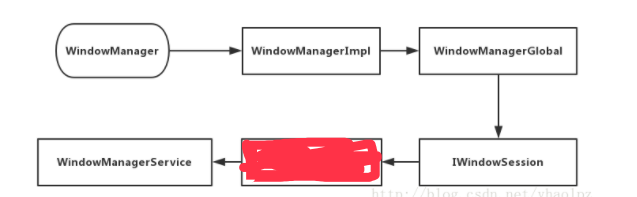
最终,Window的添加请求移交 WindowManagerService 手上了,具体的流程如下:
updateViewLayout
public void updateViewLayout(View view, ViewGroup.LayoutParams params) {
        if (view == null) {
            throw new IllegalArgumentException("view must not be null");
        }
        if (!(params instanceof WindowManager.LayoutParams)) {
            throw new IllegalArgumentException("Params must be WindowManager.LayoutParams");
        }

        final WindowManager.LayoutParams wparams = (WindowManager.LayoutParams)params;

        view.setLayoutParams(wparams);

        synchronized (mLock) {
            int index = findViewLocked(view, true);
            ViewRootImpl root = mRoots.get(index);
            mParams.remove(index);
            mParams.add(index, wparams);
            root.setLayoutParams(wparams, false);
        }
    }
这里主要是调用到scheduleTraversals()方法。
removeView
public void removeView(View view, boolean immediate) {
        if (view == null) {
            throw new IllegalArgumentException("view must not be null");
        }

        synchronized (mLock) {
            int index = findViewLocked(view, true);
            View curView = mRoots.get(index).getView();
            removeViewLocked(index, immediate);
            if (curView == view) {
                return;
            }

            throw new IllegalStateException("Calling with view " + view
                    + " but the ViewAncestor is attached to " + curView);
        }
    }